Talk to your muse.ai agent from the terminal.
muse-cli is an unofficial command-line client for your personal muse.ai agent. Send it messages, tail its events, download files it makes, and manage side chats, feed, goals, ideas, and sessions. Every command except the interactive chat prints JSON.
uv tool install muse-cli # or: pipx install muse-cli
30-second demo
Install and log in
Install the package, then run a one-time login. auth export copies your existing muse.ai session cookies from Chrome, Brave, Arc, Edge or Chromium on a Mac (log in at muse.ai first, no Node.js needed) into ~/.config/muse-cli/cookies.txt. After that, muse-cli talks to muse.ai directly. Access tokens are fetched fresh on every run.
muse-cli auth export && muse-cli status
Python 3.10 or newer. The README has the steps for Linux, Windows, and Safari.
Commands
Run muse-cli with no command for an interactive chat. The rest are one-shot and pipe cleanly into jq, cron, or another agent.
muse-cli status # VM, session count, unread, identity
muse-cli threads # main chat and side chats
muse-cli history --limit 5 # recent messages
muse-cli send "summarize my unread" --wait 120 # send, then wait for the reply
muse-cli watch --timeout 60 # tail live agent events
muse-cli feed --limit 5 # feed units
muse-cli goals | jq -r '.[].title' # goal titles
muse-cli ideas # idea cards
muse-cli session-start --title "trip planning" # new side chatFor anything without a named command, muse-cli raw calls any of the 258 known gateway methods.
Agent skill
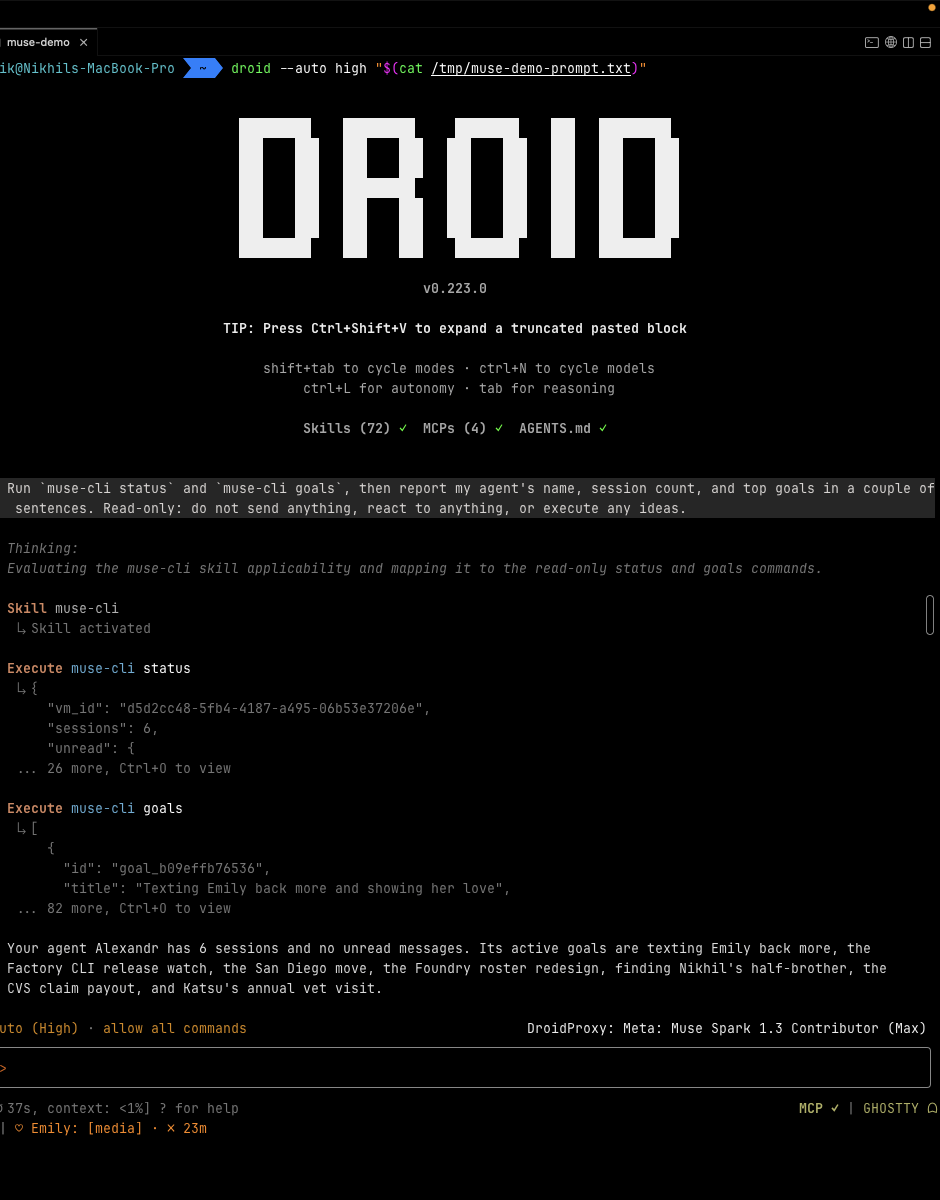
The package bundles a skill file. Install it with the installer script, or run muse-cli update --skill, and coding agents can check on and message your Muse agent. In the session below, a Droid worker activates the skill, runs muse-cli status and muse-cli goals (read-only), and reports back.
Good to know
- Unofficial and reverse engineered. muse-cli speaks the muse.ai gateway protocol: HTTPS auth, then an encrypted Noise-XX WebSocket to your personal VM. The API is unversioned and can change, so the repo documents the protocol and the method table.
- Your login stays local. The cookie file is mode 600 and is never printed or sent anywhere except muse.ai.
- Updates are opt-in. In a terminal, muse-cli checks PyPI once a day and prints a notice on stderr. Run
muse-cli updateto upgrade. SetMUSE_NO_UPDATE_CHECK=1to turn the notice off. - Write commands act as you.
send,feed-react,idea-exec, and the session commands run inside your agent, so script them with care.